
AP1 Installation PDF
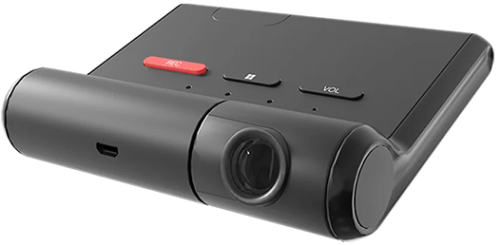
AP1 FAQs
ADAS stands for Advanced Driver Assistance Systems. ADAS is made up of electronic systems that assist drivers in the safe operation of their vehicles.
Yes. Users can choose between in-cabin audible chimes or natural language alerts. Alerts can be silenced. The associated chimes and voice alerts are configurable in the AP1 Mobile App.
A speeding warning is triggered anytime the vehicle exceeds a configurable speed threshold. A threshold is set using the AP1 configuration app or the configuration tool.
FCW stands for Forward Collision Warning, which is triggered when your vehicle is likely to collide with another object in front of the vehicle (when traveling at faster speed).
HMW stands for Headway Monitoring Warning, which is triggered when you are not maintaining a safe distance to the vehicle ahead of you. Otherwise known as “tailgating.”
LDW stands for Lane Departure Warning, which is triggered when the vehicle crosses a solid lane line while traveling at or above the minimum speed.
There’s a unique chime or phrase associated with each ADAS function.
Possibly. It depends on how you did the integration initially with SmartAPI. AP1, with ADAS events enabled, will provide three new event types: FCW, HMW and LDW. Once the ADAS events are enabled for your tenant in SmartAPI, your “listener” app will receive a callback and the payload will indicate the new event type in the “MoreInfo” area.
You may need to account for the new event types insideyour application. For example, if you’re re-hosting the callbacks into your own database, change your database to allow tracking of the new event type(s).
Yes. AP1 was purpose-built as a self-installable product. The AP1 Quick Start Installation Guide and installation video on the AP1 Setup | SmartWitness page will help you.
Yes. You can enable this option in the AP1 app under “Record.”
The engine management system (EMS) consists of a wide range of electronic and electrical components such as sensors, relays, actuators and an engine control unit. The components work together to provide the EMS with vital data parameters.
An engine control unit (ECU), also commonly called an engine control module (ECM), is used in today’s cars and trucks to control the engine and other components’ functions. An ECU is a computer with internal preprogrammed and programmable computer chips that is not much different from a home computer or laptop. The vehicle’s ECU operates the engine by using input sensors and output components to control all engine functions.
A parameter ID (PID) is a code used to interpret data from a vehicle.
Yes. AP1 will read power, ignition, speed, rpm and more. Additional data points will coincide with future firmware releases. Contact your integration team for the most up-to-date information.
Please note: Which PIDs come through is highly dependent on the manufacturer of the vehicle.
Yes. All our devices, including the AP1, will work with SmartView.
Yes. Artificial Intelligence Driving Events (AIDE) on the AP1 leverages industry-best SmartAnalytics technology, taking into account a wider range of situational context to filter out and reduce false positives by as much as tenfold.
Yes. Because the AP1 is a self-installable product, it is fairly easy to remove from one vehicle and install into another. Please ensure you can accommodate device moves from one vehicle to another in your web application and the SmartWitness SmartAPI cloud application.
There are installation alternatives to OBDII, however it is the recommendation of our technical experts that you perform a self-installation as instructed with the provided OBDII cable.
Yes. You can find instructions for the Guided Setup in the AP1 Quick Start Installation Guide. Steps for the Advanced Setup are featured in the AP1 User Guide.
The AP1 has a 128° field of view.
Assisted GPS (A-GPS) will automatically engage if a satellite GPS signal cannot be fixed with a minimum of three satellites. GPS data is drawn from local cell towers to enhance the data from the device’s GPS receiver. This is especially beneficial when the GPS receiver is in a location that is not in “line of sight” of a satellite (e.g., surrounded by tall buildings, bad weather conditions). AP1 records the location data source, so customers are aware if the location is from A-GPS or GPS satellites.
Yes.
Yes. All our devices, including the AP1, can be updated over the air.
The AP1 supports up to a 128GB microSD card. Currently, the AP1 ships with a 64GB microSD card.
The AP1 Mobile App is currently for calibration/configuration only. AP1 Viewer is now on the iOS App Store and Google Play Store. Download and play video directly from a Wi-Fi-connected AP1 camera.
You can preview, choose and set up a chime or voice notification for each event type in the app.
At 1080p, 15FPS and the 64GB microSD card included with AP1, the storage capacity is approximately 52 hours. The SD Card Storage Calculator can help you determine capacity.
Visit the iOS App Store or Google Play Store and search for “eCam Plus AP1,” or visit the AP1 Setup page for links to download the app.
The use case is a commercial vehicle that requires a road-facing, commercial-grade, low-cost, self-installable, connected dash camera that provides telematics data and the most critical ADAS functionality.
The price for the camera is the same with or without ADAS capabilities. If fleet admins purchase the AP1 without ADAS and decide to upgrade later, there’s no additional cost to the TSP, which provides partners an additional source of revenue if desired.
The AP1 is certified on AT&T and will also work on T-Mobile.
AP1 Specs
KP2 Installation PDF
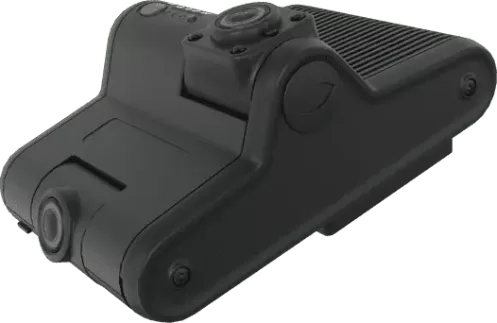
KP2 FAQs
ADAS stands for Advanced Driver Assistance Systems. ADAS is made up of electronic systems that assist drivers in the safe operation of their vehicles.
DSM stands for Driver State Monitoring. DSM is a camera-based AI safety system that monitors driver behavior.
It alerts drivers during periods where lack of awareness impedes their ability to safely operate a vehicle
(e.g., fatigue or distraction).
Yes. Users can choose between in-cabin audible chimes and natural language alerts that provide drivers with notifications. Currently, only English language alerts are available. We can add more languages in the future. There’s a unique chime or phrase associated with each ADAS event trigger. Users also have the option to silence ADAS driver alerts.
A Forward Collision Warning (FCW) is triggered when your vehicle is likely to collide with another object in front of the vehicle (when traveling at faster speed).
A Headway Monitoring Warning (HMW) is triggered when you are not maintaining a safe distance to the vehicle ahead of you. Otherwise known as “tailgating.”
A Lane Departure Warning (LDW) is triggered when the vehicle crosses a solid lane line while traveling at or above the minimum speed.
ADAS:
• FCW: Forward Collision Warning
• LDW: Lane Departure Warning
• HMW: Headway Monitoring Warning (Tailgating)
DSM:
• DFW: Driver Fatigue Warning
• DDW: Driver Distraction Warning
3-wire installation comes standard in the package contents. This is a universal installation method that applies to all vehicles. There are alternatives available, such as the OBD -PWR option. See the Optional Accessories in the KP2 User Guide for more details.
JBUS connectivity is on the product roadmap, so expect availability in the future.
This is a non-standard request for implementation and requires approval from your account manager.
The detachable driver-facing camera does not have to be purchased at the time of deployment. You can upgrade it in the field and all necessary software will be loaded and readily available.
Many union companies currently do not allow a driver-facing camera. However, this may change as contracts are renegotiated.
We prefer to provide data with KP2. However, you can receive special permission to use your own SIM cards and data plan. You must still purchase a KP2 service subscription as that covers the charges to host and access your data.
The current price for the camera is the same with or without ADAS capabilities. If fleet admins purchase the device and want to wait to enable ADAS later, there’s no additional cost to the TSP, which provides partners an additional source of revenue if desired.
Some differentiating factors include:
• DSM events powered by edge-based AI and ADAS event triggers derived from vehicle speed whenever possible. Whenever vehicle speed is irretrievable, GPS speed will be used for ADAS calculations as a fallback.
• Driver-facing and road-facing camera in one device
• Voltage detection logic
• Over-temperature step-down protocol
• Better visual resolution and frame rate
• More efficient power design
• Easy device removal bracket
• Expanded local memory — useful for larger natural language datasets
These are just a few ways the KP2 outperforms its previous generation, the CP2, and other comparable competition.
No. The onboard data storage is exactly the same and utilizes an included 64GB microSD card.
Is payment required upfront for hardware and/or installation? Can we bundle costs and pay over time?
Both capex and opex options are available. Payment upfront or through SmartPay are both viable options.
Shipping starts at the end of Q1/beginning of Q2 2022. You can place orders starting February 1.
Both. They act in the same fashion as any other event trigger in SmartView/GoCam+.
A speeding warning is triggered anytime the vehicle exceeds a configurable speed threshold. A threshold is set using the KP2 configuration tool.
The KP2 with ADAS provides three event types.
Simply enable these ADAS events for your SmartAPI tenant within the SmartAPI workstation, and your “listener” app will receive a callback.
The data payload will indicate specific ADAS event types in the “More Info” area. Please note that you may need to account for these event types in your application.
If you are “re-hosting” the callbacks into your own database, adjust your database to allow tracking of any new ADAS event types.
Visit the iOS App Store or Google Play Store and search for “SmartWitness KP2,” or visit the KP2 Setup page for QR codes to download the app.
The KP2 Installer App is currently for device calibration and event configuration.
Yes. ADAS and DSM capabilities can be toggled off.
If the KP2 is unable to receive data from the OBDII or JBUS (vehicle speed), the device will default to GPS for speed data. The potential data latency could be problematic in the event of a driver warning. Utilizing vehicle speed should be prioritized as this provides the most accurate speed data.
Yes. All our devices, including the KP2, can be updated over the air.
Yes. The telematics service provider (TSP) needs to program access points and may add up to 10 Wi-Fi access points with passwords.
This will still hold the capacity of your data card. This is priced the same as if you utilized your own SIM card, as we still charge monthly for our SmartAPI service subscription.
The driver-facing camera is not included in the standard offering. However, since the KP2 is designed to be modular, you can easily purchase the driver-facing camera and store it for later use.
Yes. All of SmartWitness’ camera solutions can use AIDE to reduce false positives.
Yes. This is optional and configurable.
Assisted GPS (A-GPS) is supported on KP2, but not currently enabled. If enabled, it will automatically engage if a satellite GPS signal cannot be fixed with a minimum of three satellites. GPS data is drawn from local cell towers to enhance the data from the device’s GPS receiver. This is especially beneficial when the GPS receiver is in a location that is not in “line of sight” of a satellite (e.g., surrounded by tall buildings, bad weather conditions). KP2 records the location data source, so customers are aware if the location is from A-GPS or GPS satellites.
In the event of rising temperatures, the KP2 will disable higher order features (DSM and ADAS) to allow the device to maintain basic functionality.
Yes. You can use the KP2 as a dual-purpose device for a GPS and video telematics 2-in-1 solution.
Yes. All our devices, including the KP2, will work with SmartView.
Yes. Artificial Intelligence Driving Events (AIDE) on the KP2 leverages industry-best SmartAnalytics technology, taking into account a wider range of situational context to filter out and reduce false positives by as much as tenfold.
All of the SmartWitness sales regions will support KP2 connectivity at launch.
Quectel SC606T. There is a North America variant and a Global variant (rest-of-world).
KP2 Specs